Notes
Language.xlsx / NDLanguage.edf need to be updated to support new "Special Effects". The client also uses: EffectEx.edfitem_combine_mgr.jsonScript\BoxItemOut.dat calculations of probability. Probability is now determined using the total combined chance of all rewards rather than a fixed 10000. Reward is now fully randomized according to configured chances, not affected by reward order.Script\SetItemEff.dat and replaced it with the following configuration files: HGKProtect\config\set_item_eff.csv and HGKProtect\config\set_item_eff_linked.csv. The client now uses SetItemEffectNew.edf.Map\Map_Data.spt and replaced it with Map\map_data.csvInitialize\PvpCashPoint.ini and replaced it with the following configuration files: HGKProtect\config\pvp_talik_recovery.csv, HGKProtect\config\pvp_class_value.csv, HGKProtect\config\pvp_lv_limit.csvserver\Initialize\WorldSystem.iniedit [MainThread] section
[MainThread]
SleepTerm = 0
SleepValue = 0
SleepIgnore = 1
add new section for [DQSThread]
[DQSThread]
SleepTerm = 0
SleepValue = 0
SleepIgnore = 1
Before you begin, ensure the following:
BILLING (with table tbl_UserStatus containing the Id column as binary), RF_USER, and RF_WORLD.BILLING, RF_USER, and RF_WORLD.Possibility 1
Initialize, Map, Quest, or Scripts)Possibility 2
global.json or any .json files, validate your .json configuration HERE..json config files do not exist.Possibility 3
environment.json.Possibility 4
tbl_schema_version and database_migration.json.Possibility 5
\RF_Bin\Initialize\PvpCashPoint.ini.Possibility 6
enable_server_certificate_verification to false at environment.jsonPossibility 7
ResourceItem.dat that need to be corrected: irstl02 irstl03 irstl04 irstl05 irqsa04 ircry03 ircsa40 irchm54 ircme55 irrtn01 irqsa05 irqsa07 irqsa08 irbud08PotionItem.dat make sure EffCode is exist at PotionItemEffect.datBulletItem.dat make sure EffectIndex is exist at BulletItemEffect.datPotionItemEffect.dat, ClassSkill.dat, Force.dat, Skill.dat, BulletItemEffect.dat make sure you use valid TempEffectType, TempParamCode, TempValue, ContParamCode, ContParamIndex, and ContValue.XXXItem.dat make sure you use valid EffCode and EffUnit.Eff is valid and exists, otherwise, it will cause issues.Possibility 8
BoxItemOut.dat needs to have all non-existent item codes removed from its results.Component: addon.box_smart_open Failed due to: found error. see log ..\ZoneServerLog\Systemlog\LoadingProcess.log
bxxts04 and bxxts05.bxqsa03 and delete iwtjt40.iyfil25, iyfil26, iyfil27, iyfil28, iyfil29, iyfil30, iyfil31, iyfil32, iyfil33, iyfil34, iyfil35, iyfil36, iyfil37, iyfil38, iyfil39, iyfil40, iyfil41, iyfil42, iyfil43, iyfil44, iyfil45, iyfil46, iyfil47, iyfil48, iyfil49, iyfil50, iyfil51, iyfil52, iwtjt40.Advice
Initialize, Map, Quest, and Scripts.environment.jsonPossibility 1
tbl_personal_billing and tbl_user.Solution: Use the BILLING database with table tbl_userstatus containing the Id column as binary, then run the queries below.
/* HGK BILLING */
USE [BILLING]
GO
ALTER PROCEDURE pAddCashAmount
    @s_userid varchar(20),
    @s_subsystem_name varchar(64),
    @s_cash float
AS
BEGIN
    SET NOCOUNT ON;
    DECLARE @before_amount float = -1
    DECLARE @after_amount float = -1

    UPDATE [dbo].[tbl_UserStatus]
    SET  @before_amount = [Cash], [Cash] += @s_cash, @after_amount = [Cash] + @s_cash
    WHERE [id] = CONVERT(binary,@s_userid);

    INSERT INTO [dbo].[tbl_change_amount] ([userid],[subsystem_name],[change],[before_amount],[after_amount],[Date])
    VALUES (@s_userid,@s_subsystem_name,@s_cash,@before_amount,@after_amount,GETDATE())

    SELECT 1 as operation_status;
END
GO

USE [BILLING]
GO
ALTER PROCEDURE pAddPcBangTime
    @s_userid varchar(20),
    @s_subsystem_name varchar(64),
    @addhour int
AS
BEGIN
    SET NOCOUNT ON;
    IF (SELECT Status As BillType FROM [tbl_UserStatus] WHERE Id = CONVERT(binary,@s_userid)) = 2
        UPDATE [tbl_UserStatus] SET DTEndPrem = DATEADD(HOUR, @addhour, DTEndPrem) WHERE Id = CONVERT(binary,@s_userid);
    ELSE
        UPDATE [tbl_UserStatus] SET Status = 2, DTEndPrem = DATEADD(HOUR, @addhour, GETDATE()) WHERE Id = CONVERT(binary,@s_userid);

    SELECT 1 as operation_status;
END
GO

USE [BILLING]
GO
ALTER PROCEDURE [dbo].[pGetPcBangTime]
    @s_userid varchar(20)
AS
BEGIN
    SET NOCOUNT ON;
    SELECT DTEndPrem as pc_bang_end FROM [tbl_UserStatus] WHERE Id = CONVERT(binary,@s_userid);
END
GO

USE [BILLING]
GO
ALTER PROCEDURE pSubCashAmount
    @s_userid varchar(20),
    @s_subsystem_name varchar(64),
    @s_cash float
AS
BEGIN
    SET NOCOUNT ON;
    BEGIN TRANSACTION;
    BEGIN TRY
        IF @s_cash <= 0
            SELECT 0 as operation_status;
        ELSE BEGIN
            DECLARE @before_amount float = -1
            DECLARE @after_amount float = -1

            UPDATE [dbo].[tbl_UserStatus]
            SET  @before_amount = [Cash], [Cash] -= @s_cash, @after_amount = [Cash] - @s_cash
            WHERE [Id] = CONVERT(binary,@s_userid);

            INSERT INTO [dbo].[tbl_change_amount] ([userid],[subsystem_name],[change],[before_amount],[after_amount],[Date])
            VALUES (@s_userid, @s_subsystem_name, -@s_cash, @before_amount, @after_amount, GETDATE())

            SELECT
                CASE
                    WHEN @after_amount < 0 THEN 0
                    ELSE 1
                END as operation_status;

            IF @after_amount < 0
                RAISERROR (15600,-1,-1, 'pSubCashAmount');
        END
    END TRY
    BEGIN CATCH
        IF @@TRANCOUNT > 0
            ROLLBACK TRANSACTION;
    END CATCH;

    IF @@TRANCOUNT > 0
        COMMIT TRANSACTION;
END
GO
/*END OF LINE HGK */
Possibility 2
Solution: Insert your account into the tables manually, or run the query below (but make sure you are using BILLING with tbl_userstatus (id: binary)) to automatically insert your account when you open the Cash Shop.
USE [BILLING]
GO
ALTER PROCEDURE [dbo].[RF_CheckBalance]
    @Login varchar(13),
    @Balance bigint = 0 OUTPUT
AS
BEGIN
    SET NOCOUNT ON;

    IF NOT EXISTS (SELECT Cash FROM [dbo].[tbl_UserStatus] WITH (NOLOCK) WHERE id = CONVERT(binary, @Login)) BEGIN
        INSERT INTO [dbo].[tbl_UserStatus] (Id, Status, Cash, DTStartPrem, DTEndPrem) VALUES (CONVERT(binary, @Login), 1, 0, GETDATE(), GETDATE());
        SET @Balance = 0;
    END
    ELSE BEGIN
        SET @Balance = (SELECT [Cash] FROM [dbo].[tbl_UserStatus] WITH (NOLOCK) WHERE [Id] = CONVERT(binary, @Login));
    END
END
GO
Configure looting speed to 500 ms
system.player.json
"loot_take_delay_ms": 500,
"loot_delay_clamp_min": 0,
"loot_delay_clamp_max": 100,
client_memory_patch.json
"address": "0x13F7EF",
"value": "F401"
Ensure character position synchronization after each attack
fix.attack_system.json → force_fix_position
"skill_required": true,
"force_required": true,
"normal_required": true,
"siege_required": true,
"mau_required": true,
"spec_required": true
Apply a short delay to player actions following MAU mount or dismount (to prevent skip animation or cheat things)
fix.attack_system.json → unit_acting_delay
"take": 2100,
"leave": 1567
Display the number of online users for website
main_thread.json
"save_server_display": true,
Show chip HP only for GM characters (council behavior remains the same)
stone_hp.json
"min_lv": 100
client_memory_patch.json
"address": "0x144F8E",
"value": "EB"
Restrict character names to contain only letters and numbers
create_player.json
{
    "rules": [
        {
            "pattern": "[^a-zA-Z0-9]",
            "group_tag": "memek"
        }
    ],
    "groups": {
        "memek": {
            "min_match": 0,
            "max_match": 1
        }
    }
}
Show/Hide upgrade Success Chance
enchant_chance.json → show_chancestrue or false\server\HGKProtect\Enchant.edf → put to patch \client\datatable\Enchant.edfTweak
Possibility 1
RF_Online.bin and for Server: HGKProtect.dllPossibility 2
GateIP or ZonePort is misconfigured.GateIP can be configured in WorldInfo.ini, and ZonePort can be configured in server_memory_patch.json.Possibility 3
Possibility 1
Possibility 2
client_memory_patch : server\HGKProtect\memory_patch.bin and put into client\System\memory_patch.binradius : server\HGKProtect\RadiusView.edf and put into client\DataTable\RadiusView.edftransmog : server\HGKProtect\Transmog.edf and put into client\DataTable\Transmog.edfitem_sockets : server\HGKProtect\GemSockets.edf and put into client\DataTable\GemSockets.edffast_combination : server\HGKProtect\FastCombination.edf and put into client\DataTable\FastCombination.edfseason_pass : server\HGKProtect\SeasonPass.edf and put into client\DataTable\SeasonPass.edfenchant_upgrade_ex : server\HGKProtect\Enchant.edf and put into client\DataTable\Enchant.edfequip_durability : server\HGKProtect\ItemRepair.edf and put into client\DataTable\ItemRepair.edf.ini, .spr, and .dds.Possibility 3
enabled, but the path to asset_encrypt.key is incorrect. To fix this, update asset_encryption.json with the correct path of asset_encrypt.key.disabled, but you are still using encrypted files.asset_encrypt.key.asset_encrypt.key.Possibility 4
.msh), item-related files (e.g., .edf), or UI-related files (e.g., .spr), may cause issues.Possibility 5
Item.edf such as ResourceItem, make sure that EffNum and Eff match.resource_effects.ini has invalid configuration.The E symbol is responsible for ignoring the value and transferring the value, only one material containing such a symbol is possible in the materials. in the results, this symbol is responsible for copying the value The D symbol is responsible for ignoring the value, there are no restrictions on its use in materials. for results this symbol has no meaning if combination material has a reference marker (E) in enchant, then the index for LR will be selected from this material (this is especially useful when it is necessary to indicate several LL in the materials) examples of materials with values that are a marker for enchant transfer material with 0xEEEEEEEE suits any enchant, any number of slots material with 0x7EEEEEEEE will ignore all enchant, requires 7 slots material with 0x5FFFFEEE will ignore taliks in first 3 holes, other holes must be empty, requires 5 slot result with 0x7EEEEEEEE, transfer all enchant, expose 7 slots result with 0x5FFFFEEE, transfer enchant from the first three holes, set 5 slots examples of materials with values that are not a marker for enchant transfer material with 0xDDDDDDDD suitable for any enchant, any number of slots material with 0x7DDDDDDD will ignore all enchant, requires 7 slots material with 0x5FFFDDDD will ignore taliks in first 3 slots, other holes must be empty, requires 5 slots if you make a combination with materials that do not have E symbols, and use E symbols in the results, then the result is undefined if you make a combination with several materials that have E symbols, and use E symbols in the results, then the result is undefined
RadarItem.datFind EffSort, add 5th value 0 / 1.
| Description | |
|---|---|
| OFF / always show commonex-3-3 (default behavior) | |
0 |
OFF / always show commonex-3-3 |
1 |
activate radar extended |
rdpvp03 was 1110 its gonna be the same as 1110011101By default, you need to edit client\SpriteImage\common\commonex.spr to represent the icon information.
| Description | |
|---|---|
commonex-3-1 |
Same Race |
commonex-3-2 |
Same Race, Race Leader |
commonex-3-3 |
Bellato |
commonex-3-4 |
Bellato, Race Leader |
commonex-3-5 |
Cora |
commonex-3-6 |
Cora, Race Leader |
commonex-3-7 |
Accretia |
commonex-3-8 |
Accretia, Race Leader |
commonex-3-9 |
Pitboss |
EffNum and Eff must match.ResourceItem.dat: irstl02 irstl03 irstl04 irstl05 irqsa04 ircry03 ircsa40 irchm54 ircme55 irrtn01 irqsa05 irqsa07 irqsa08 irbud08Below is a list of all resource effects.
| Description | |
|---|---|
1 |
Discount NPC Purchase/Sell |
2 |
EXP Gain Rate |
3 |
Language Translator |
4 |
Item Level |
5 |
EXP Gain Rate |
6 |
PT Gain Rate |
7 |
Mining Speed |
8 |
Item Drop Rate |
9 |
EXP Gain Rate |
10 |
Discount NPC Purchase |
11 |
Discount NPC Sell |
12 |
HP Regeneration |
13 |
FP Regeneration |
14 |
SP Regeneration |
15 |
Max HP |
16 |
Max FP |
17 |
Max SP |
18 |
Attack |
19 |
Melee Attack |
20 |
Melee Skill Damage |
21 |
Range Attack |
22 |
Range Skill Damage |
23 |
Force Attack |
24 |
Defense |
25 |
Vamp (Damage to HP) |
26 |
Vamp (Damage to FP) |
27 |
Vamp (Damage to SP) |
28 |
Radius of Monster Aggro |
29 |
MAU Attack (Melee Weapon) |
30 |
MAU Attack (Range Weapon) |
31 |
MAU Attack (Force Weapon) |
32 |
MAU Attack (Defense) |
33 |
Animus Attack (Force Weapon) |
34 |
Animus Attack |
35 |
Animus Attack |
36 |
Animus Attack |
37 |
Animus Attack |
38 |
Attack of Melee/Range Weapon |
39 |
Skill Range |
40 |
Ignore Nuclear Debuff |
41 |
Movement Speed |
42 |
Reflects 100% of Received Damages |
43 |
Accuracy (Melee Weapon) |
44 |
Accuracy (Range Weapon) |
45 |
Force Accuracy |
46 |
Skill Accuracy |
47 |
Chance of Critical Attack |
48 |
Accuracy |
49 |
Avoid |
50 |
Restricts Actions |
51 |
Chance Resurrect On Death *DO NOT USE* |
52 |
Monsters Level Requirement |
53 |
Party Level Requirement |
54 |
Reflects of Received Damages |
55 |
Using any teleport scrolls |
56 |
+100% Chance Avoid |
57 |
Block Chance |
58 |
-100% Potion Delay |
59 |
PT Melee Gain Rate |
60 |
PT Range Gain Rate |
61 |
PT Force Gain Rate |
62 |
PT Defense Gain Rate |
63 |
PT Shield Gain Rate |
64 |
PT Animus Gain Rate |
65 |
PT MAU Gain Rate |
71 |
EXP Gain Rate |
72 |
EXP Gain Rate |
73 |
Item Drop Rate |
74 |
Item Drop Rate |
75 |
Item Drop Rate |
76 |
Detect |
77 |
Debuff Duration |
78 |
Chance Ignore Shield Block |
79 |
Ignorant Talic in Weapon |
80 |
Favor Talic in Armors |
81 |
Chance to Protect Items from Dropping on Death *DO NOT USE* |
82 |
All PT Gain Rate |
84 |
Max SP |
85 |
FP Cost |
86 |
Accuracy |
87 |
Avoid |
88 |
Max HP/FP |
89 |
Attack |
90 |
Defense |
91 |
Skill Level |
92 |
Stealth |
93 |
Detect |
94 |
Remove Damage Protection Skill |
95 |
Movement Speed |
96 |
Reveals information about enemy vulnerability |
97 |
FP Regeneration |
98 |
Force Attack |
99 |
Max FP |
100 |
Vamp (Damage to HP) |
101 |
Vamp (Damage to HP) |
102 |
Critical Attack Chance |
103 |
Attack Range |
104 |
Defense |
105 |
Debuff Duration |
106 |
HP Regeneration |
107 |
Avoid |
108 |
Attack Delay (Launcher) |
109 |
Force Attack Range |
110 |
Chance Receiving Critical Attack |
111 |
Block Chance |
112 |
Elemental Resistance |
113 |
Max HP |
114 |
Debuff Duration |
115 |
Chance Ignore Shield Block |
116 |
Range Skill Delay |
117 |
Melee Skill Delay |
118 |
Force Delay |
120 |
Magnet Loot |
client\DataTable\en-gb\resource_effects.ini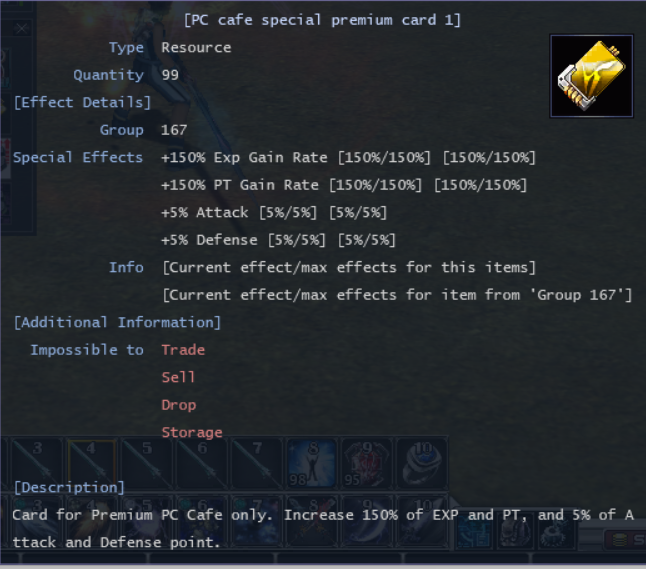
This is regarding how effects gonna applied if character have multiple ResourceItem with same ItemSerise
Open: resource_serise.json and to be safe, set it to: dynamic
Below is an explanation and example
CCR behaviour :
on clients side : dynamic type
on server side : (pay attention to the order on last line):
99 item A + 99 item B = 50 value
99 item A + 99 item B + 99 item C = 500 value
99 item A + 99 item C + 99 item B = 50 value

example : item have same ItemSerise
item A : value 5, max value 50
item B : value 5, max value 50
item C : value 5, max value 500

static type (group boundaries are formed globally and do not depend on items in the inventory):
99 item A + 99 item B = 100 value
99 item A + 99 item B + 99 item C = 500 value

dynamic type (group boundaries are formed depending on the items in the inventory):
99 item A + 99 item B = 50 value
99 item A + 99 item B + 99 item C = 500 value
This can only be used by monsters.
Do not apply it to characters!
Open: ClassSkill.dat (need to use 2 column: ContParamCode, ContParamIndex, and ContValue)
| ContParamCode1 | ContParamIndex1 | ContValue1 | Description | |
|---|---|---|---|---|
| Reflect Damage | 3 |
54 |
0.42 |
42% damage taken will be reflected to the attacker. |
| ContParamCode2 | ContParamIndex2 | ContValue2 | Description | |
|---|---|---|---|---|
| Chance to Reflect | 3 |
0 |
0.88 |
Theres 88% chance damage will be reflected. |
Conclusion: There is an 88% chance for damage to be reflected, with 42% of the damage being returned to the attacker.
[GMCommands] alterpoint[Gem Socket] socket_item_records.csv socket_gem_records.csv[Transmog] transmog_records.csv[Council Election] vote.json[Fast Combine] fast_combination.csv[EnchantEx] enchant_explicit.csv[Regen Points] auto_recover_point.json[Equipments Repair] repair_records.csv| Type | Description |
|---|---|
dalant |
Race currency |
gold |
Gold currency |
pvp_point or pvp |
[PvpCash] PVP Points (PVP) |
pc_point or pc |
[PvpPoint] Contribution Points (CPT) |
processing_point or pp |
[ActionPoint_0] Processing Points (from ore cutting) |
hunter_point or hp |
[ActionPoint_1] Hunting Points (from killing monsters) |
gold_point or gp |
[ActionPoint_2] Gold Points (usually from gold capsules) |
act_point_3 or ap3 |
[ActionPoint_3] Recover Points (used for recover sold items at NPC a.k.a module buyback) |
act_point_4 or ap4 |
[ActionPoint_4] New Points 4 |
act_point_5 or ap5 |
[ActionPoint_5] New Points 5 |
act_point_6 or ap6 |
[ActionPoint_6] New Points 6 |
act_point_7 or ap7 |
[ActionPoint_7] New Points 7 |
act_point_8 or ap8 |
[ActionPoint_8] New Points 8 |
act_point_9 or ap9 |
[ActionPoint_9] New Points 9 |
These are all the possible TempEffectType used for point-based effects in the potion module
| TempEffectType | Description |
|---|---|
190 |
Cash Points |
204 |
Race currency |
205 |
Gold currency |
184 |
[PvpPoint] Contribution Points (CPT) |
185 |
[PvpCash] PVP Points (PVP) |
186 |
[ActionPoint_0] Processing Points |
187 |
[ActionPoint_1] Hunting Points |
188 or 57 |
[ActionPoint_2] Gold Points |
210 |
[ActionPoint_3] Recover Points |
211 |
[ActionPoint_4] New Points 4 |
212 |
[ActionPoint_5] New Points 5 |
213 |
[ActionPoint_6] New Points 6 |
214 |
[ActionPoint_7] New Points 7 |
215 |
[ActionPoint_8] New Points 8 |
216 |
[ActionPoint_9] New Points 9 |
Below are the new button IDs used by NPC
| Text | Description | |
|---|---|---|
164 |
Repair Item | Open equipment repair window |
165 |
Transmogrification | Open transmog window for converting original equipment into new equipment skins |
166 |
Undo Transmogrification | Open undo transmog window for reverting equipment skin to their original form |
167 |
Gem Socketing | Open gem socketing window |
168 |
Recover Sold Items | Open buyback window |
ipwhp01 can be used anytimeipwhp01 must be peace stateUseState specified for ipwhp01, comparing to ipwhp03 can be used anytime.Solution: PotionItem.dat → code ipwhp01 → UseState 1
| Description | |
|---|---|
0 |
anytime |
1 |
peace state |
2 |
battle state |
3 |
dead state |
NDLanguage.edf > Serial 1935 > change to [Invoice: %s]NDLanguage.edf → Serial 2665 → change the text to The unmanned mining tool is under attack.